> ## Documentation Index
> Fetch the complete documentation index at: https://docs.mantlebio.com/llms.txt
> Use this file to discover all available pages before exploring further.
# Release 1.24
> June 18, 2024
In this release of Mantle, our primary focus has been on enhancing the usability of Mantle datasets.
We are excited to announce a host of new features designed to improve your experience.
Below are detailed descriptions of the key updates and improvements we have made.
# New Features
### SDK Updates
NOTE: We have officially changed the Mantle SDK to use the word `dataset` instead of `entity`;
however, using `entity` is still supported for backward compatibility.
The Mantle SDK has two major changes around the functionality of datasets:
* Querying in the SDK for `data_type`, `name`, `unique_id`, AND properties!
* Convert a query result to a dataframe in a single step.
#### Querying Datasets
The Mantle SDK can now filter datasets by property value:
```python theme={"system"}
fooIsBar = mantle.dataset.build_query()
.where("props.{foo}.string.eq=Bar").execute()
```
Or by datatype:
```python theme={"system"}
fooIsBar = mantle.dataset.build_query()
.where("data_type_unique_id=foo").execute()
```
This allows for finding any dataset you might need for an analysis (No need to remember Unique IDs! 🥳)
#### Converting to a DataFrame
Once you have a list of datasets from your query, you can convert it to a Pandas
DataFrame that includes your dataset properties as columns:
```python theme={"system"}
fooIsBarDf = fooIsBar.to_dataframe()
```
This will automatically convert the list of datasets to a pandas dataframe for easy analysis.
For more information, see: [SDK Dataset documentation](/sdk/datasets)
### All Datasets View
Mantle has introduced a *BRAND NEW* way to visualize your datasets through the UI,
an all datasets view. You can filter datasets by property, data type, and name from one navigation.
 ### Primitives within Nextflow Parameters
You can now directly access a Mantle parameter of type `string`, `integer`, `double`, `bool`,
or `file` from directly within your pipeline using Nextflow params.
By configuring your input parameters config with:
```json theme={"system"}
"input_integer": {
"type": "INT"
}
```
You can access the integer value from within your pipeline:
```groovy theme={"system"}
params.input_integer
```
For more information, reach out to the Mantle team.
### Datatype Creation
You can now create new datatypes from the Mantle UI:
### Primitives within Nextflow Parameters
You can now directly access a Mantle parameter of type `string`, `integer`, `double`, `bool`,
or `file` from directly within your pipeline using Nextflow params.
By configuring your input parameters config with:
```json theme={"system"}
"input_integer": {
"type": "INT"
}
```
You can access the integer value from within your pipeline:
```groovy theme={"system"}
params.input_integer
```
For more information, reach out to the Mantle team.
### Datatype Creation
You can now create new datatypes from the Mantle UI:
 For instructions on how to see: [Create a datatype documentation](/features/datatypes_and_datasets/create_a_datatype)
### Self-Service Notebook Environments
You can now configure an analysis environment self-service within the Mantle UI.
You can configure them to contain pip, conda, or open-source git repos.
For instructions on how to see: [Create a datatype documentation](/features/datatypes_and_datasets/create_a_datatype)
### Self-Service Notebook Environments
You can now configure an analysis environment self-service within the Mantle UI.
You can configure them to contain pip, conda, or open-source git repos.
 For more detailed instructions, see: [Create an analysis environment documentation](/features/analyses/create_an_analysis_environment)
### History View
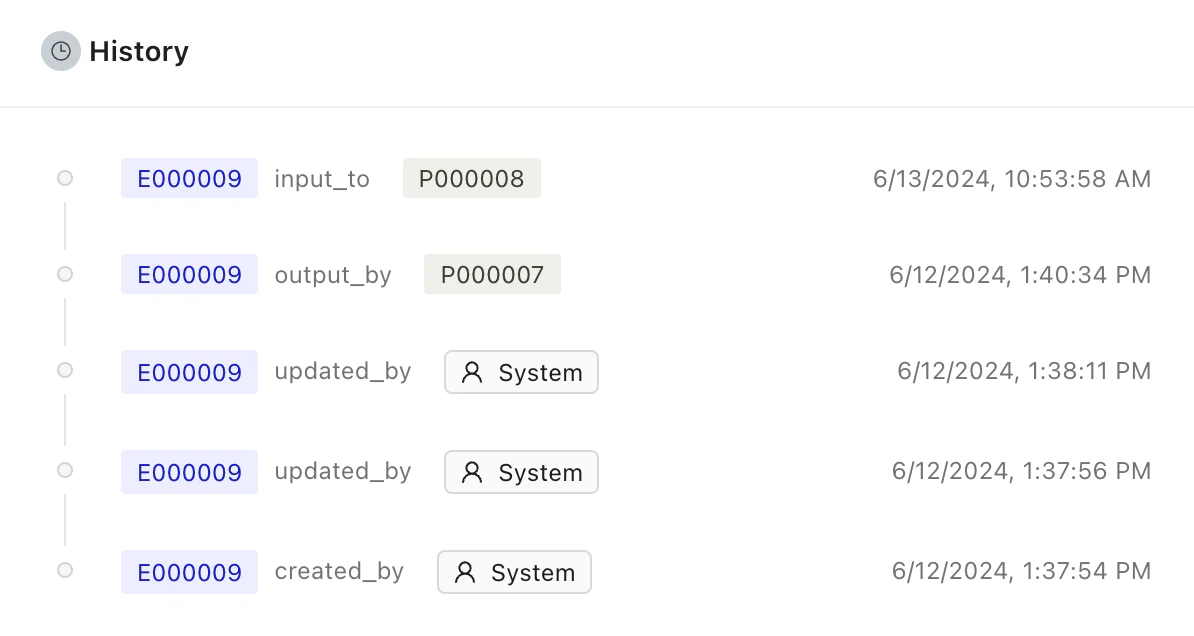
We have updated the history view on the single dataset view:
* Now contains back links to analyses, pipelines, and entities
* \[Enterprise Only] Shows any data ingest and egress.
For more detailed instructions, see: [Create an analysis environment documentation](/features/analyses/create_an_analysis_environment)
### History View
We have updated the history view on the single dataset view:
* Now contains back links to analyses, pipelines, and entities
* \[Enterprise Only] Shows any data ingest and egress.